Introduction
When you upload a video on YouTube, it feels simple. You select a file, hit upload, wait for processing, and soon the video plays smoothly on any device, at any internet speed, anywhere in the world. Behind this simplicity is a highly engineered video pipeline designed for scale, reliability, and performance. This blog breaks down the complete YouTube style video pipeline from upload to playback in a clean, human readable way, focusing especially on transcoding and large scale delivery.
1. The Big Picture
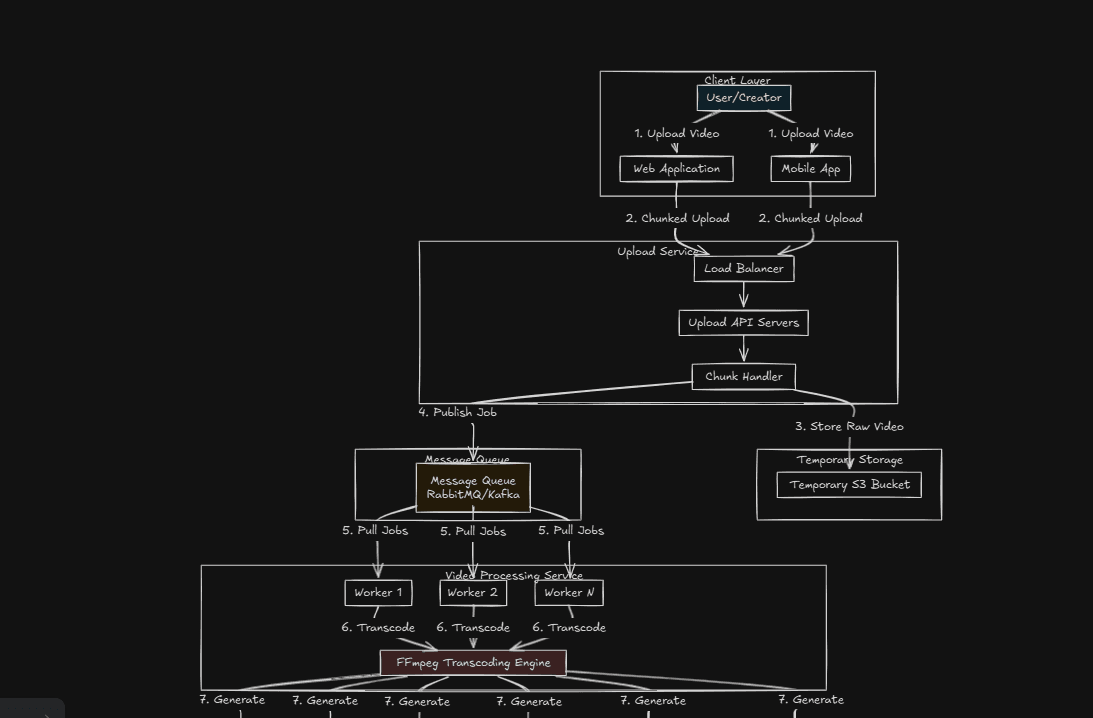
At a high level, the YouTube pipeline does five major things: • Accepts video uploads from millions of users • Stores the original video safely • Transcodes the video into many formats and qualities • Distributes the video across the globe • Streams the best possible version to each viewer in real time Each step is independent but tightly coordinated.
2. Video Upload and Ingestion
When a creator uploads a video, it does not go directly to a single server.
Upload from the Client
Instead: • The client connects to the nearest upload server using geo routing • Large files are uploaded in chunks • Each chunk is verified and resumable Chunked uploads are critical. If the internet drops at 70 percent, the upload resumes instead of restarting.
Upload API Layer
Once chunks arrive: • Metadata is validated • User permissions are checked • The upload is registered in internal systems • A unique video ID is generated At this point, the video is accepted but not yet watchable.
3. Original Video Storage
The uploaded file is called the source or mezzanine file. This file is: • Stored in distributed object storage • Replicated across multiple data centers • Treated as read only and immutable The original file is never edited or streamed directly. It acts as the master copy for all future processing.
Why This Matters
If YouTube improves its codec or compression years later, it can reprocess old videos again from the original source.
4. Metadata and Database Layer
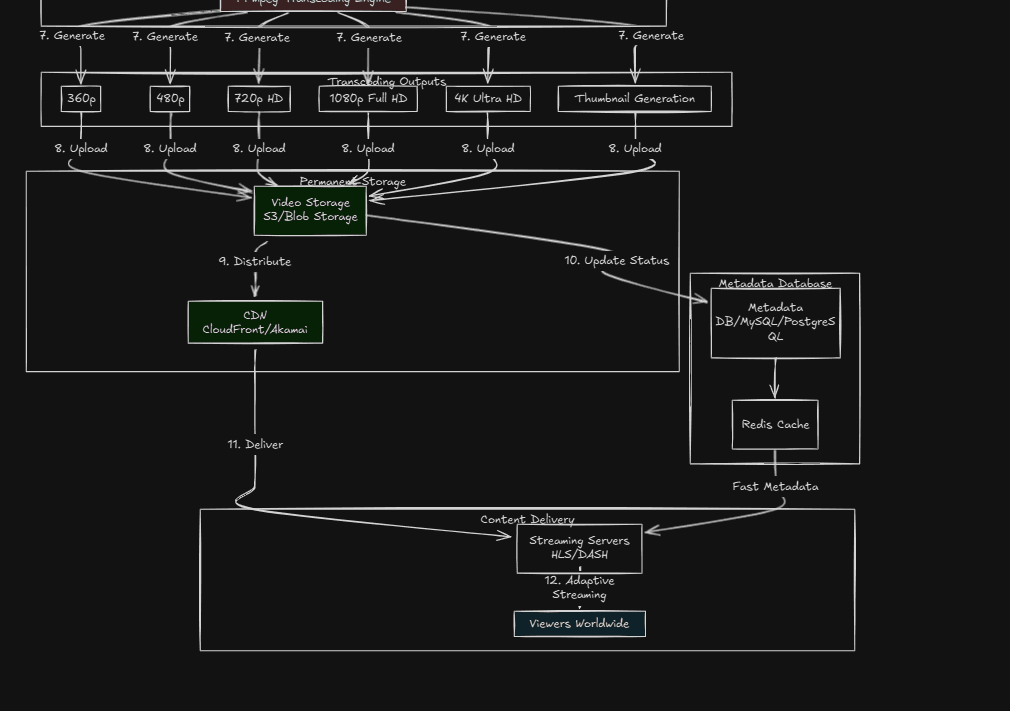
Parallel to storage, metadata is saved: • Title • Description • Tags • Language • Duration • Frame rate • Resolution • Audio channels This metadata lives in large scale distributed databases and is used by: • Search and recommendations • Ads systems • Copyright detection • Analytics The video file and the metadata move through the system independently.
5. Transcoding Pipeline
This is the heart of the system.
Why Transcoding is Needed
Creators upload videos in many formats: • MP4, MOV, MKV • Different resolutions like 4K, 1080p, 720p • Different codecs like H.264, HEVC, AV1 Viewers also use many devices: • Phones • Laptops • Smart TVs • Low and high bandwidth networks One uploaded file cannot satisfy everyone. So YouTube creates many optimized versions.
Job Creation
After upload: • A message is placed into a processing queue • Transcoding workers pick up the job • Each worker handles a specific output This allows massive parallelism.
Video Decoding
First step: • The original video is decoded into raw frames • Audio is extracted separately This step is CPU and GPU intensive.
Encoding into Multiple Qualities
The video is then encoded into multiple resolutions such as: • 144p • 240p • 360p • 480p • 720p • 1080p • 4K and beyond Each resolution also has multiple bitrates. • Lower bitrates for slow internet • Higher bitrates for fast connections Modern codecs used include: • H.264 for compatibility • VP9 for efficiency • AV1 for future focused compression Encoding uses tools similar to FFmpeg at massive scale.
Audio Transcoding
Audio is also processed separately: • Multiple bitrates • Different formats • Stereo and surround Audio is then synchronized with video segments later.
Thumbnail Generation
During transcoding: • Keyframes are detected • Multiple thumbnails are generated • Thumbnails are optimized for different screens This improves click through rate and performance.
6. Video Segmentation
After encoding, videos are split into small segments. Typical segment length: • 2 to 6 seconds Why segmentation matters: • Faster startup • Smooth quality switching • Better caching Each segment is an independent file.
7. Adaptive Streaming Formats
YouTube does not stream a single video file. Instead, it uses adaptive bitrate streaming. Two common standards: • DASH • HLS How it works: • Player measures network speed • Requests the best quality segment available • Switches quality dynamically without stopping playback This is why videos downgrade during poor network and upgrade when WiFi improves.
8. Content Distribution Network
Once processed, videos move to the CDN.
What the CDN Does
• Stores video segments close to users • Reduces latency • Reduces load on central servers Popular videos are cached heavily near users. Less popular videos are fetched on demand. This is how YouTube serves billions of hours daily.
9. Playback on the Viewer Side
When you press play: • Player fetches metadata and manifest file • Chooses initial quality based on device and bandwidth • Requests video and audio segments • Buffers a few seconds ahead • Continuously adapts quality All of this happens seamlessly.
10. Reliability and Scale
YouTube operates at extreme scale. To handle this: • Every service is stateless • Failures are expected and tolerated • Jobs are retryable • Data is replicated globally If one data center fails, playback continues without users noticing.
11. Why This Architecture Works
This pipeline succeeds because: • Upload, processing, and playback are decoupled • Everything is asynchronous • Transcoding is massively parallel • Storage is cheap and distributed • Streaming is adaptive It is not just about videos. This architecture is a blueprint for any large media platform.
12. Building a Smaller Version Yourself
A simplified version can be built using: • Go or Node for upload APIs • Local or cloud object storage • FFmpeg for transcoding • A message queue for jobs • DASH or HLS for streaming Even a basic implementation teaches system design, backend engineering, and scalability concepts.
Final Thoughts
The YouTube video pipeline is not magic. It is careful engineering layered over time. Every smooth playback hides: • Distributed systems • Video compression science • Queue based processing • Global delivery networks Understanding this pipeline gives you insight not only into YouTube, but into how modern internet scale systems are built.