Introduction
Imagine waking up to find that a malicious actor has stolen your GitHub tokens, AWS credentials, and npm access keys—all while you were simply installing a popular npm package. This isn't a hypothetical scenario; it's exactly what happened in the Shai-Hulud attack, a sophisticated supply chain attack that compromised 28,000+ GitHub repositories and exposed thousands of developer secrets. The attack got its name from the giant sandworms in the sci-fi novel Dune—and like those creatures, this attack burrowed deep into the npm ecosystem, spreading automatically and consuming everything in its path.
What Made It Dangerous
What makes it particularly dangerous is that it turns your own tools against you, weaponizing legitimate security scanning tools to steal your secrets. The attack spread automatically through dependency chains, making it extremely difficult to contain once it started.
How the Attack Worked
The Shai-Hulud attack was a multi-stage supply chain attack that exploited the npm ecosystem:
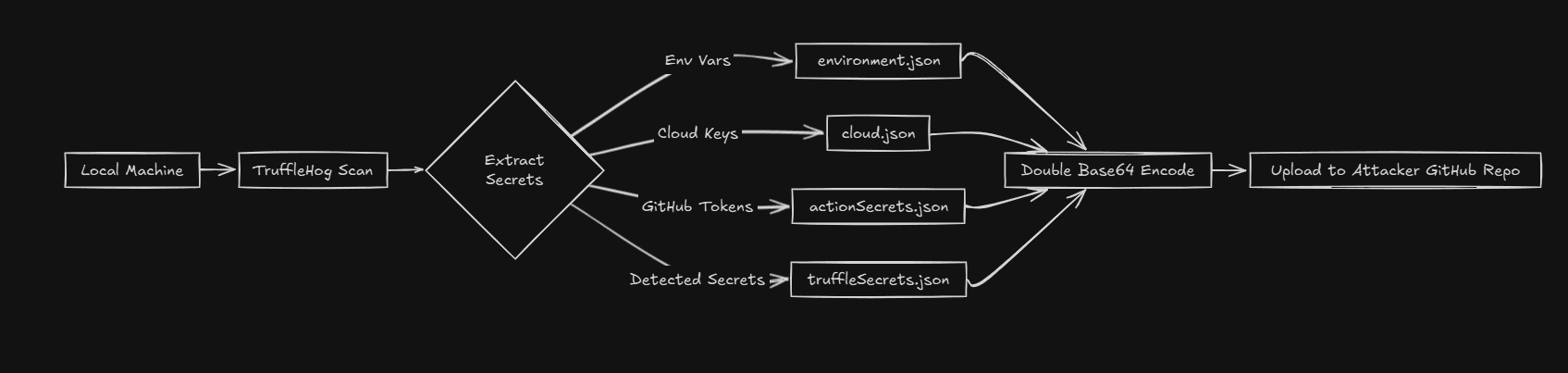
- Stage 1: Package Compromise - Attackers compromised popular npm packages, injecting malicious code into legitimate packages
- Stage 2: Automatic Execution - When developers installed these packages, the malicious code automatically executed during the installation process
- Stage 3: Secret Theft - The code scanned for environment variables, API keys, GitHub tokens, AWS credentials, and other sensitive information
- Stage 4: Exfiltration - Stolen secrets were sent to attacker-controlled servers
- Stage 5: Self-Replication - The attack used stolen credentials to compromise more repositories and packages, creating a self-replicating worm
The Attack Flow
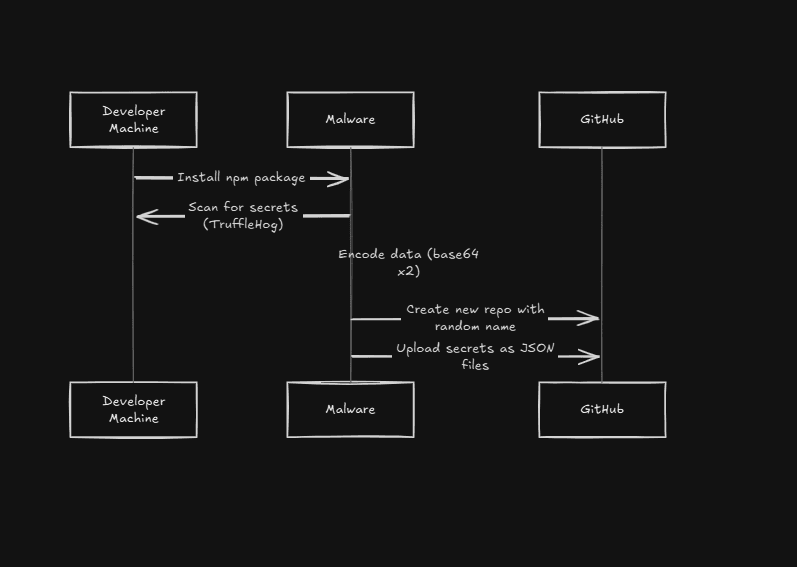
Here's how a typical attack unfolded:
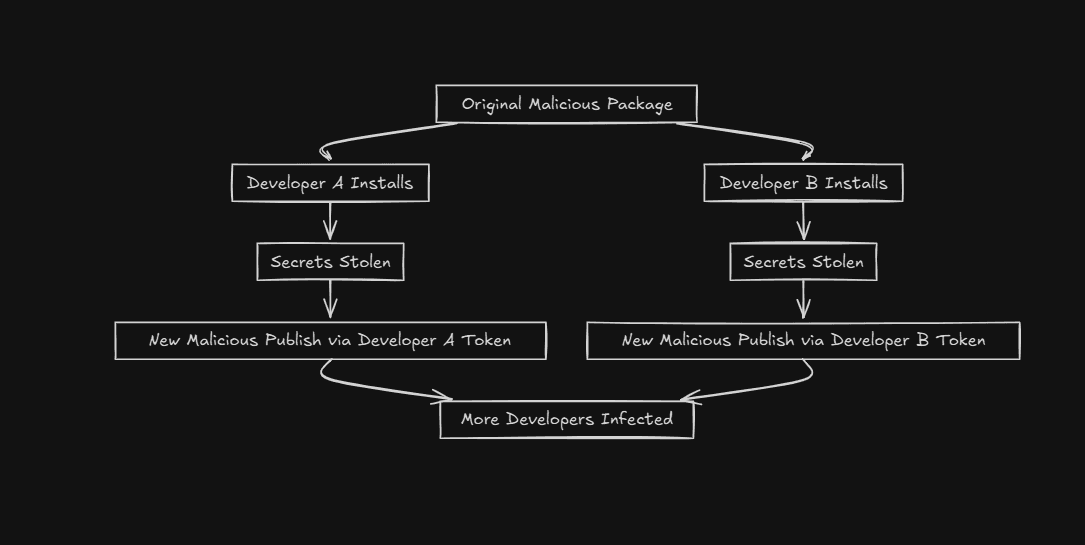
- Developer installs a compromised npm package (often a dependency of a dependency)
- Post-install script executes malicious code automatically
- Code scans the system for secrets in environment variables, config files, and CI/CD systems
- Stolen credentials are exfiltrated to attacker servers
- Attackers use stolen GitHub tokens to push malicious code to more repositories
- The cycle repeats, spreading the attack automatically
Why It Was So Effective
The attack was particularly effective because:

- It exploited trust in the npm ecosystem - developers trusted popular packages
- It used legitimate tools - security scanners were weaponized to find secrets
- It spread automatically - once started, it replicated itself through the dependency chain
- It was hard to detect - the malicious code looked like legitimate security scanning
- It had a long dwell time - many developers didn't realize their secrets were stolen until much later
The Impact
The Shai-Hulud attack had devastating consequences:
- 28,000+ GitHub repositories compromised
- Thousands of developer secrets exposed (API keys, tokens, credentials)
- Multiple organizations' infrastructure compromised
- Supply chain attacks on downstream projects
- Loss of trust in the npm ecosystem
How to Protect Yourself
Protecting against supply chain attacks requires multiple layers of defense:
- Use lock files (package-lock.json, yarn.lock) and commit them to version control
- Review dependencies regularly - use tools like npm audit, Snyk, or Dependabot
- Implement secret scanning - use tools like GitGuardian, TruffleHog, or GitHub's secret scanning
- Use least privilege - don't give packages more permissions than necessary
- Monitor for suspicious activity - set up alerts for unexpected API calls or credential usage
- Use dependency pinning - pin exact versions instead of using ranges
- Regularly update dependencies - but test updates before deploying
- Use private npm registries for sensitive projects
- Implement CI/CD security checks - scan for vulnerabilities before deployment
- Never commit secrets to version control - use environment variables or secret management tools
Best Practices
Additional best practices to follow:
- Verify package integrity - check package signatures when possible
- Limit post-install scripts - be cautious of packages that run scripts during installation
- Use automated security tools - integrate security scanning into your development workflow
- Educate your team - make sure everyone understands supply chain attack risks
- Have an incident response plan - know what to do if you discover a compromise
Lessons Learned
The Shai-Hulud attack taught us several important lessons:
- Supply chain security is critical - attacks can come through dependencies
- Trust but verify - even popular packages can be compromised
- Defense in depth is essential - multiple security layers are needed
- Automation is a double-edged sword - it can help attackers too
- Security is an ongoing process - not a one-time setup